Make Every Media File Play Smoothly.
K-Lite Codec Pack builds a reliable playback layer for Windows, adding the decoders and splitters that modern and legacy formats expect.
Fix audio dropouts, black screens, and subtitle issues without changing your default player or loading unsafe add-ons.
Get the Latest PackFree to use, regularly maintained, and focused on safe playback.
Broad Format Support
Handle MKV, MP4, AVI, MOV, FLAC, AAC, and more without guesswork
Fast, Guided Setup
A clear installer gets playback working in minutes
Transparent & Free
No subscriptions or hidden extras, with straightforward removal
What the Playback Stack Includes
Codecs decode compressed streams, and containers such as MKV or MP4 need splitters to expose every track. K-Lite Codec Pack installs a balanced, Windows‑ready stack so files are recognized and played correctly.
Instead of forcing a new player, it upgrades the Windows pipeline directly. The result is smoother playback, reliable audio tracks, and subtitles that stay synchronized.
Essential Components
Adds trusted decoders and splitters so Windows reads file structures without conflicts.
Accurate Track Parsing
Improves container parsing for multi‑audio, subtitles, and HDR streams.
Clear Install Flow
Built for legitimate playback with a simple setup and clean removal.
Player‑Friendly
Enhances Windows playback while keeping your player and settings intact.
What the Pack Covers
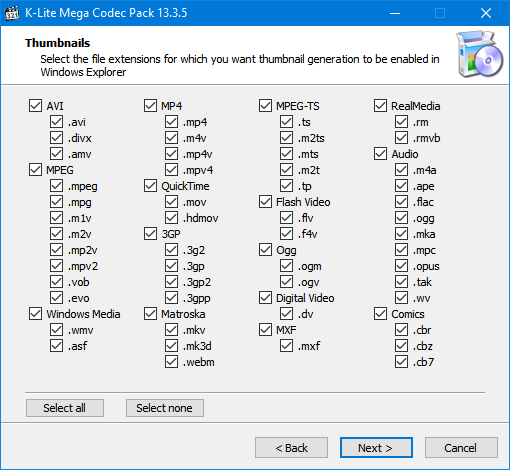
Video Formats
H.264, H.265, VP9, AV1, DivX, Xvid, plus legacy formats
Audio Formats
MP3, FLAC, AAC, Vorbis, Opus, and other common codecs
Player Compatibility
Pairs well with Windows Media Player, MPC‑HC, and other players
Safe by Design
Built for legitimate playback with a clean, transparent install
Trusted Playback, Every Day
Trusted globally for consistent Windows playback. Free to use, actively maintained, and built for legitimate media use.
"Playback is consistent again, even with older archives, and setup was quick."
"No more format errors, and it works with every player I use."
"Clean install, no extras, and removal is straightforward if needed."
Three Simple Steps
Download
Grab the latest pack directly from the official download page
Install
Run the wizard and choose only the components you need
Play
Open your media files and enjoy reliable playback
Helpful Answers
Getting Started
Compatibility & Performance
Security & Trust
Ready to upgrade playback?
Get the Latest PackWhere It Helps Most
Video Playback
Play modern and legacy video formats without compatibility errors
Audio Playback
Handle more audio formats with stable decoding
Classic Formats
Open older files that modern players may skip
Large Libraries
Maintain big collections knowing files will play reliably